What Is Cloud Storage and How Does It Actually Work?
Understanding cloud storage and how does it actually work involves looking past the marketing buzzwords to the physical infrastructure powering our digital lives. At its core, this technology allows you to save data on remote servers managed by a third-party provider rather than keeping it all on your local device.
By shifting the burden of hardware maintenance and data accessibility to massive, highly secure facilities, individuals and organizations can gain flexibility and peace of mind. This article explores the mechanics behind these services, the different ways they categorize your information, and the security measures protecting your digital assets in the modern age.
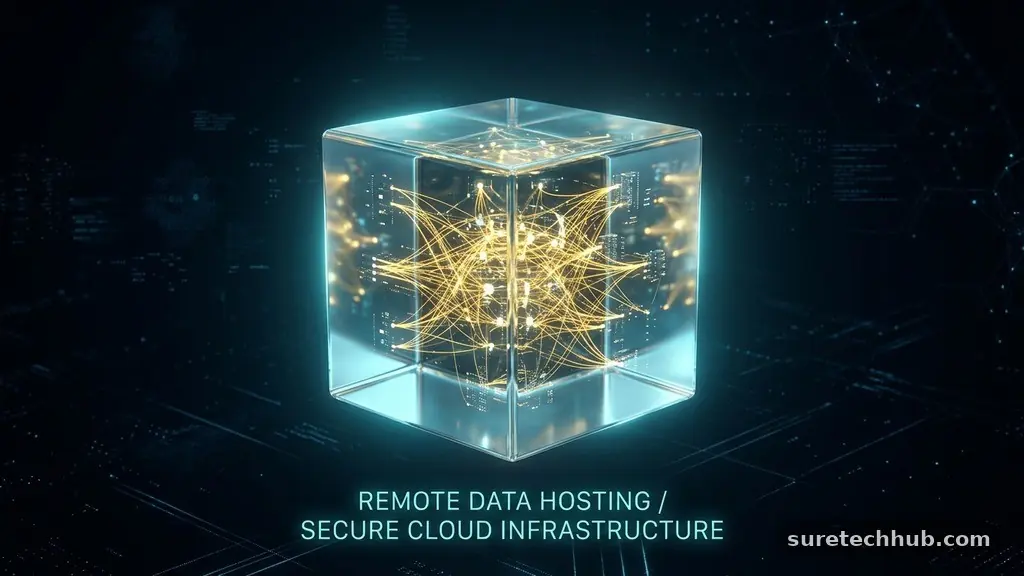
The Fundamental Concept of Remote Data Hosting
When you upload a photo or a document to a service like Google Drive or Dropbox, you aren’t sending it into a literal cloud. You are transmitting that file over the internet to a physical server rack located in a massive data center.
These facilities are often owned by tech giants who have invested billions into cooling systems, redundant power supplies, and high-speed network connectivity. By moving your files to these remote locations, you gain the ability to access them from any device, provided you have a stable internet connection.
This process transforms your local storage limitation into a scalable utility. Instead of being tethered to a single hard drive that could fail or be lost, your data resides in an environment designed for high availability. These servers use complex software to manage how your information is stored, replicated, and retrieved.
When you request a file, the system identifies where that data is kept across their global network and delivers it back to you in milliseconds. It turns the physical act of storing bits on a disk into a managed service.
How Your Files Move Across the Internet
The journey of a file starts the moment you click the upload button. Your computer or smartphone breaks that file down into small packets of data to make it easier to transmit over the network.
These packets are then sent through your local router and out to the broader internet infrastructure, eventually reaching the provider’s gateway. Once they arrive, the cloud service reassembles these packets into their original form and writes them onto their storage hardware.
Encryption plays a vital role during this transit phase to ensure your privacy. Before the data even leaves your device, modern services often scramble the information using complex mathematical algorithms.
Even if a malicious actor intercepted these packets during the transfer, they would only see unreadable noise. Only your device and the server hold the keys to translate that data back into a usable format, providing a layer of protection that keeps your personal documents shielded from unauthorized eyes.
The Three Primary Types of Cloud Storage
Not all storage is created equal, and providers often categorize their services based on how the data is structured. These categories determine how efficiently your system can interact with the files you store. Understanding these distinctions helps when choosing the right solution for personal use or for a growing business.
| Storage Type | Best For | Primary Characteristic |
|---|---|---|
| Object Storage | Unstructured data | High scalability and metadata usage |
| Block Storage | Databases and applications | High performance and low latency |
| File Storage | Shared office environments | Hierarchical folder structures |
Object storage is the most common form for photos, videos, and large archives because it treats every piece of data as a distinct object with its own unique identifier. Block storage, conversely, breaks data into smaller, fixed-size chunks that can be accessed independently, making it a favorite for high-performance applications. File storage mimics the traditional folder structure you see on your desktop, which makes it intuitive for standard office tasks where multiple people need to edit the same shared documents.
Redundancy and Data Protection Mechanics
One of the biggest advantages of these services is the guarantee that your data won’t vanish if a single piece of hardware fails. Providers utilize a strategy called redundancy, where they automatically copy your files across multiple physical servers or even different geographic locations.
If the primary server housing your data experiences a mechanical failure, the system instantly switches to a backup copy. This is why you rarely experience downtime when using a reputable provider.
This architectural resilience is managed through sophisticated software that monitors the health of every disk in the facility. If a drive shows signs of wear, the system proactively moves the data to a new, healthy unit without you ever knowing it happened.
It is a highly automated process that minimizes human intervention and maximizes uptime for your important files. You can learn more about how cloud computing standards are defined by organizations like NIST to better understand the reliability expectations in this industry.
Public Cloud vs. Private Infrastructure
When people ask what is cloud storage and how does it actually work in a corporate context, they are often comparing public and private models. A public cloud service is shared among many different customers who use the same physical infrastructure, though their data remains strictly isolated.
This is the most cost-effective option for most users because the provider distributes the overhead costs across millions of subscribers. It’s like living in an apartment building; you have your own private space, but you share the underlying utilities.
Private cloud storage, on the other hand, involves dedicated hardware that is used by only one organization. This provides total control over security protocols and performance, but it comes at a much higher price tag.
Large corporations or government agencies often opt for this route when they handle highly sensitive data that cannot reside on shared hardware. For most individuals, the public model offers the perfect balance of affordability, convenience, and high-level security.
Security Measures Behind the Scenes
The security of your remote files is not just about the software; it is about the physical reality of the data centers. These facilities are built like fortresses, featuring biometric scanners, 24-hour security patrols, and strictly controlled access points.
Even if someone physically broke into the building, they would find thousands of identical black server racks with no way to identify which one holds your specific information. The layers of physical and digital security work in tandem to keep your data safe.
* Encryption at rest: Data is encrypted while sitting on the disk, not just while moving.
* Two-factor authentication: Requires a second form of verification beyond just a password.
* Access logs: Keeps a digital trail of every time someone attempts to view or edit a file.
* Automatic patching: Providers update their systems regularly to block newly discovered security threats.
These measures ensure that even in the event of a breach, the information remains useless to the intruder. The industry has moved toward a “zero-trust” model, where the system assumes that any request could be a threat and verifies every single action. By requiring constant authentication and keeping software updated, providers can stay ahead of common cyber threats that target older, unmanaged storage systems.
Scaling and Cost Management
A major benefit of these services is the ability to scale your capacity on demand. When you start, you might only need a few gigabytes of space for basic documents.
As your library of photos and videos grows, you can simply upgrade your subscription to get more room instantly. You never have to go to a store to buy a new hard drive or worry about the physical limitations of your current machine.
This pay-as-you-go model also helps with cost management for businesses. Instead of investing thousands of dollars upfront in servers that might sit idle, companies only pay for the storage they actually use.
This flexibility allows them to allocate resources toward growth rather than hardware depreciation. The system effectively turns a capital expense into a predictable operating cost, which is a significant advantage in today’s fast-paced digital economy.
Frequently Asked Questions
Is it necessary to have cloud storage?
It is not strictly mandatory, but it is highly recommended for anyone who values their data. Without it, you are entirely dependent on the health of your physical devices, which are prone to accidents, theft, or simple hardware failure.
What happens if I run out of cloud storage?
Typically, the service will stop accepting new uploads until you free up space or upgrade your plan. Some providers might also restrict your ability to sync files across devices, though you can usually still download and delete your existing files to make room.
What is a common disadvantage of using these services?
The primary disadvantage is the reliance on a stable internet connection. If you are in an area with poor connectivity, accessing large files can be slow or impossible, and you lose the ability to sync your work in real-time.
Why am I being asked to pay for more storage?
Providers offer a small amount of space for free to get you started, but maintaining the servers, electricity, and security infrastructure costs money. Once you exceed that initial threshold, you are essentially renting additional space on their high-performance hardware.
Can my files be accessed by the provider’s employees?
Most reputable providers use automated systems that prevent human access to your files. While they technically have the ability to access data in rare legal scenarios, they generally use end-to-end encryption to ensure that not even they can read the contents of your private documents.
Final Thoughts
Understanding cloud storage and how does it actually work reveals a complex, efficient system designed to simplify our digital lives. By leveraging remote servers, advanced encryption, and redundant hardware, these services provide a level of data protection that would be nearly impossible to achieve on your own. Whether you are backing up family photos or managing a business database, the cloud offers a scalable and secure way to keep your information accessible.
As you continue to use these platforms, remember to keep your credentials strong and take advantage of features like two-factor authentication. Embracing this technology allows you to focus on your work and memories rather than the technical details of hardware management, giving you more freedom in how you interact with your digital world.