How to Tell If an Email or Website Is a Phishing Scam
Learning the art of telling If an Email or Website Is a Phishing Scam remains one of the most vital digital skills for anyone active online today. Cybercriminals constantly refine their deceptive tactics to compromise personal information, often using urgency or fear to trigger a hasty reaction. By focusing on specific indicators like sender addresses, mismatched URLs, and unnatural tone, you can effectively protect your data from these malicious actors.
This article provides a clear roadmap to help you identify threats before they result in a compromise. You will gain the confidence to scrutinize incoming messages and browse the web without falling for common traps designed to steal your credentials.
Identifying Suspicious Sender Details
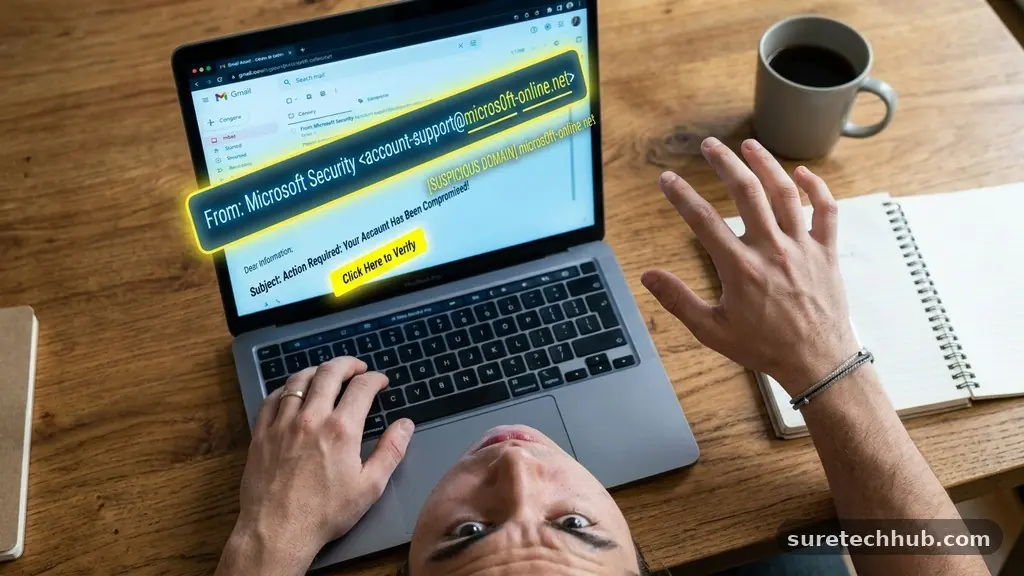
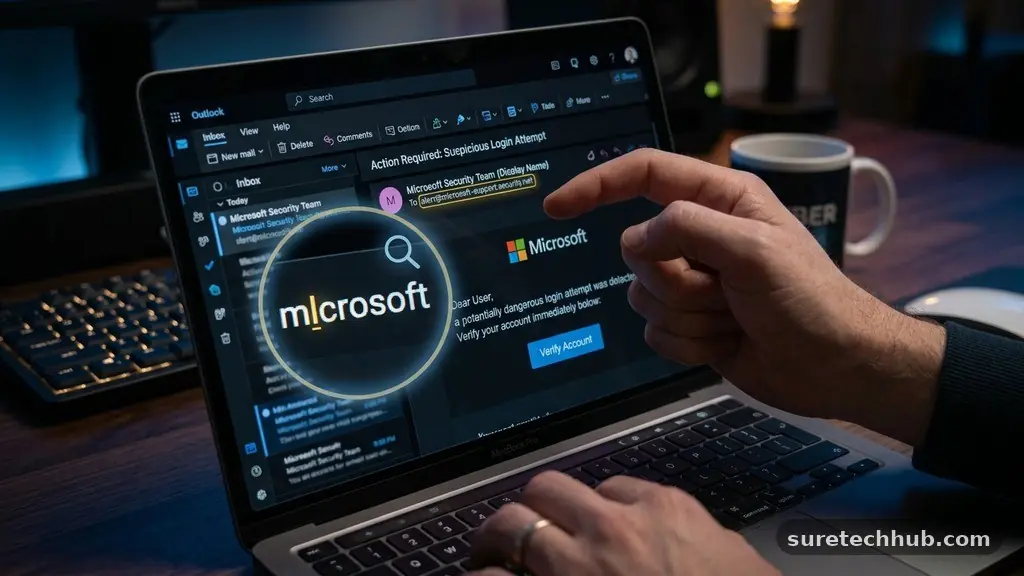
The first line of defense in telling If an Email or Website Is a Phishing Scam is examining the sender’s identity with extreme skepticism. Scammers often spoof the display name to make an email look like it comes from a legitimate company like Amazon or Netflix. However, the actual email address behind that name often tells a different story.
You should always click on or hover over the sender’s name to reveal the full email address. If the display name says “Customer Support” but the address is a random string of characters or a public domain like @gmail.com, you are likely looking at a trap.
Generic greetings are another common hallmark of fraudulent communication. Legitimate organizations usually address you by your name, especially when discussing account-related issues. A message that starts with “Dear Customer” or “Dear Member” is an immediate red flag.
Professional companies typically maintain a consistent brand voice, so a sudden shift in tone or an abundance of typos suggests a lack of oversight. Always remember that banks and reputable services rarely ask for sensitive information like passwords or social security numbers through an email.
Analyzing Links and URL Patterns
When you receive a message containing a link, your primary task is to verify its true destination before clicking. Hovering your mouse cursor over any hyperlink will display the actual URL in the bottom corner of your browser. You must pay close attention to the domain structure, as scammers often use slight misspellings to trick the eye.
For example, a malicious actor might use “amaz0n.com” instead of “amazon.com” to redirect you to a fake login portal. This subtle substitution is a classic technique for stealing credentials.
If you are on a mobile device, you cannot hover, so you should instead long-press the link to see the URL preview. If the address looks long, convoluted, or uses a suspicious shortening service, avoid it entirely. Many phishing campaigns rely on shortened URLs to hide the final destination of the malicious site.
You can often verify the legitimacy of a website by navigating to the company’s official homepage through your own browser bookmark rather than following a link provided in an unsolicited message. This simple habit significantly reduces your risk of landing on a credential-harvesting page.
Recognizing Artificial Urgency
Scammers thrive on the psychological pressure of artificial urgency because it forces the victim to act before they think. You might receive an email claiming that your account will be suspended in 24 hours if you do not verify your information immediately. This manufactured crisis is designed to bypass your critical thinking skills and provoke an emotional response.
Legitimate companies almost never demand immediate action under threat of account closure via an email link. If you feel a sudden spike of anxiety while reading a message, pause and step away from your device for a moment.
This tactic is often paired with an offer that seems too good to be true, such as an unexpected refund or a prize notification. If you receive an email stating you have won a contest you never entered, it is almost certainly a phishing attempt.
The goal here is to get you to provide financial information under the guise of paying a “processing fee” or “tax” on your winnings. Always verify these claims by contacting the supposed sender through an official phone number or support chat found on their verified website.
Comparing Legitimate vs Phishing Indicators
Understanding the technical and visual differences between secure communication and malicious attempts is essential for your digital safety. The following table highlights common discrepancies that can help you identify a potential threat.
| Feature | Legitimate Communication | Phishing Attempt |
|---|---|---|
| Sender Address | Matches official domain (e.g., support@bank.com) | Public domain or misspelled (e.g., bank-support@xyz.net) |
| Greeting | Personalized with your name | Generic like “Dear User” or “Valued Customer” |
| Call to Action | Requests login via official app or site | Urgent link to a suspicious login page |
| Spelling/Grammar | Professional and error-free | Noticeable typos or awkward phrasing |
Protecting Your Personal Information
Once you identify a suspicious message, your next steps are just as important as the detection itself. You should never reply to a phishing email or provide any information, as doing so confirms that your email address is active and potentially vulnerable.
Instead, you should mark the message as spam or junk in your email client to help train your provider’s filters. If the message appears to be from a well-known brand, you can often forward it to their dedicated abuse department to assist in their security efforts.
It is also wise to check your account activity directly from a known, secure device if you suspect a breach. Do not use the links provided in the suspicious email; instead, type the company’s URL directly into your browser or use their official mobile app. Enabling multi-factor authentication on all your accounts adds a critical layer of protection.
Even if a phisher manages to steal your password, they will still be unable to access your account without the second factor, such as a code sent to your phone. You can find comprehensive resources on best practices through the Cybersecurity and Infrastructure Security Agency.
Common Questions About Phishing
What should I do if I accidentally clicked a phishing link?
If you clicked a link, disconnect your device from the internet immediately to prevent further communication with the malicious server. Change your passwords for any accounts that might have been compromised, starting with your email account. If you entered financial information, contact your bank or credit card provider right away to freeze your accounts and report the potential fraud.
Are phishing attempts only found in emails?
No, phishing can occur through SMS, known as “smishing,” and via direct messages on social media platforms. The tactics remain largely the same, focusing on urgency and malicious links. Always treat unsolicited messages on any platform with the same level of scrutiny you apply to your inbox.
Why do scammers use typos in their messages?
While it seems counterintuitive, some scammers intentionally include typos to filter out skeptical users. By targeting people who are less likely to notice errors, they ensure that the people who do click their links are more likely to fall for the final part of the scam. It is a way of optimizing their time for the most vulnerable targets.
Can a website look real but still be a phishing site?
Yes, modern phishing kits allow attackers to perfectly clone the appearance of popular websites. They copy the logos, color schemes, and layout of legitimate brands to create a false sense of security. Always check the URL in your browser’s address bar, as this is the one thing they cannot perfectly replicate if they are using a different domain.
How do I report a phishing attempt?
Most major email providers have a “Report Phishing” button in their interface. You can also report suspicious websites to search engines or the organization being impersonated. Reporting these threats helps protect other users and allows security teams to take down malicious sites faster.
Staying Safe Online
Mastering the process of telling If an Email or Website Is a Phishing Scam provides a robust defense against modern digital threats. By staying alert for generic greetings, mismatched URLs, and artificial urgency, you can maintain control over your personal data.
Remember that your skepticism is your most effective security tool. If a message feels off or asks for information you shouldn’t be sharing, it is always better to err on the side of caution.
Take the time to update your security settings and enable multi-factor authentication wherever possible. These small, proactive habits create a significant barrier against those who wish to exploit your trust. Keep your software updated and continue to educate yourself on the evolving landscape of online security.
Your vigilance makes the internet a safer place for everyone. If you ever feel uncertain about a message, trust your instincts and verify the source through official channels before you act.