How to Choose the Right Cloud Backup Service for Your Files
Selecting the right cloud backup service for your files involves balancing your storage needs with security requirements and budget constraints. Many people struggle with this decision because the technical specifications often feel overwhelming or unnecessarily complex.
By focusing on a few critical pillars like encryption, ease of restoration, and automated scheduling, you can find a solution that protects your digital life without constant maintenance. This process of choosing the Right Cloud Backup Service for Your Files is about finding a reliable safety net that works quietly in the background, ensuring your personal or professional data remains accessible whenever you need it most.
Understanding the Difference Between Sync and Backup
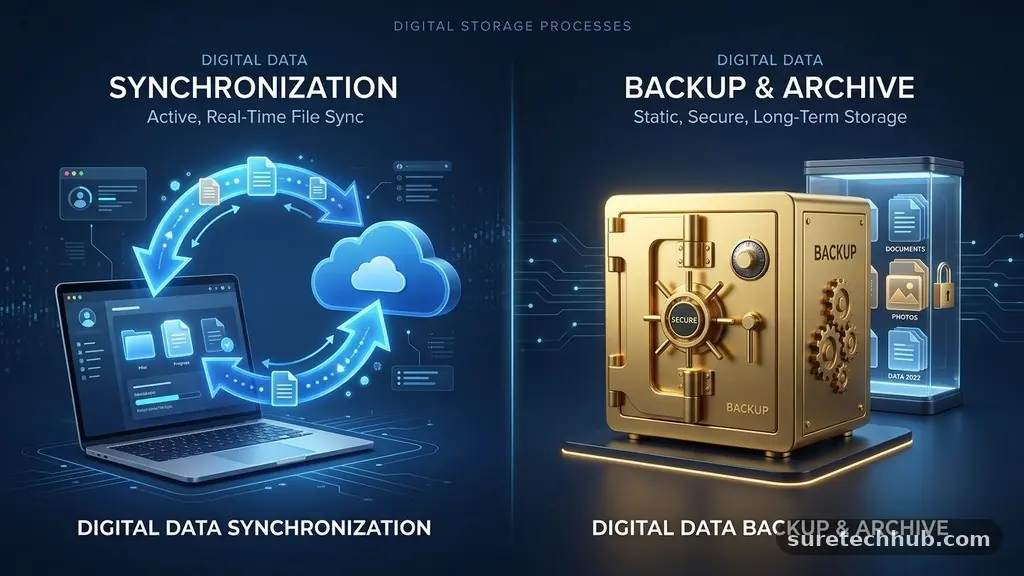
One of the most common mistakes users make is confusing cloud storage services with dedicated backup solutions. Services like Dropbox or Google Drive are primarily designed for file synchronization, which means they mirror changes made on your local device to the cloud. If you accidentally delete a file on your computer, that change is often reflected in the cloud almost immediately, potentially resulting in the loss of your data.
Dedicated backup services operate differently because they focus on versioning and long-term retention. When you use a specialized backup tool, it captures snapshots of your files at specific intervals.
This allows you to restore a version of a document from three weeks ago even if you modified it yesterday. For serious protection, you need a service that prioritizes these historical snapshots over simple file mirroring.
Always verify whether a provider offers “block-level” incremental backups. This technology only uploads the specific parts of a file that have changed rather than re-uploading the entire document every time you save a small update. This saves significant bandwidth and ensures that your internet connection remains usable while the background processes run.
Prioritizing Security and Encryption Standards
Your data is only as safe as the encryption protocols protecting it during transit and at rest. Most reputable services use AES-256 encryption, which is a standard that provides a high level of security for your sensitive information. However, the most important feature you should look for is “zero-knowledge” or “private” encryption.
With zero-knowledge encryption, the service provider does not hold the master key to decrypt your files. Only you possess the password or key required to access your data, meaning the company itself cannot view your personal documents even if they are served with a legal request. If you lose your password under this system, you might lose access to your data permanently, so you must manage your credentials with extreme care.
Check if the provider offers multi-factor authentication (MFA) for your account login. Adding a secondary layer of verification, such as an app-based code or a physical security key, makes it significantly harder for unauthorized users to compromise your account. You can find detailed information on how these security standards function by reviewing resources from the National Institute of Standards and Technology regarding encryption technologies.
Evaluating Pricing Models and Storage Limits
Many options exist when it comes to subscription models, ranging from flat-fee unlimited plans to tiered storage buckets. Unlimited plans are often marketed as the most convenient choice for users with massive media libraries or thousands of high-resolution photos. However, you should read the fine print to see if there are hidden “throttling” policies that slow down your connection after you reach a certain data threshold.
Tiered plans are usually more cost-effective if you have a predictable amount of data that doesn’t fluctuate wildly month to month. If you only need to store office documents and basic project files, you might find that a smaller, cheaper tier is perfectly sufficient. Avoid paying for terabytes of space that you will never realistically fill.
Consider how the price scales as your data grows over time. Some providers offer a low introductory rate that jumps significantly after the first year, which can lead to unexpected expenses. Always calculate the total cost of ownership over a three-year period rather than just looking at the monthly sticker price.
| Service Type | Best For | Typical Cost Model |
|---|---|---|
| Unlimited Backup | Large media collections | Flat monthly/yearly fee |
| Tiered Storage | Specific file sets | Per-GB or per-TB pricing |
| Personal Sync | Active collaboration | Fixed monthly subscription |
Assessing Restoration Speed and Reliability
The true value of a backup service is only proven during the restoration process. If your computer crashes or you lose your laptop, you need to be able to download your files quickly and easily. Some services offer a “bare metal” restore option, which allows you to recover your entire operating system, applications, and settings in one go.
Test the recovery process before you actually need it. Many providers allow you to download a small subset of your files through their web interface to check the speed of their servers. If a provider takes hours to prepare a simple file download, they will likely be even slower when you need to recover hundreds of gigabytes of data.
Look for providers that offer physical shipping options for massive restores. If you lose 5TB of data, downloading it over a standard home internet connection could take weeks. Some companies will mail you an encrypted hard drive containing all your backed-up data, which can save you significant time during a major recovery operation.
Checking Compatibility Across Your Devices
You likely use a mix of hardware, including laptops, tablets, and smartphones. Choosing the Right Cloud Backup Service for Your Files requires ensuring that your chosen provider supports every operating system you own. A service that works perfectly on Windows might have a crippled or non-existent client for macOS or Linux.
Check the mobile app experience provided by the company. You should be able to view, share, and occasionally edit your backed-up files while on the go. While you don’t necessarily need full backup functionality on your phone, the ability to access your document library is a major convenience for modern users.
If you are a small business owner, check for centralized management dashboards. These allow you to monitor the backup status of multiple computers from a single screen. This feature is essential for ensuring that all your team members’ files are being captured without needing to check each machine individually.
Understanding Retention Policies and Versioning
Retention policy refers to how long the service keeps deleted or modified files before purging them from their servers. A short retention period, such as 30 days, might be dangerous if you don’t notice a file is missing until months later. Look for providers that offer at least 90 days of file version history, or ideally, an option for permanent retention.
Versioning is the feature that saves you from ransomware or accidental corruption. If a malicious script encrypts your files, you can simply roll back your entire system to a version from the day before the infection occurred. This is a critical defense mechanism that simple storage services often lack.
Consider the “deleted file” policy as well. Some services will automatically delete files from the cloud if they haven’t been detected on your local machine for a set amount of time. If you often disconnect external drives or clear out old folders, you need to ensure your backup service won’t interpret those actions as a command to delete your backups.
Common Questions About Backup Services
What is the biggest risk if I don’t use a dedicated backup service?
The primary risk is permanent data loss caused by hardware failure, theft, or ransomware. Standard cloud storage is not a backup, and if your sync folder is compromised, you lose everything.
How much storage space should I actually pay for?
Calculate the total size of your critical data, such as photos, documents, and unique projects, then add a 25% buffer for future growth. You rarely need to back up your entire operating system or installed applications unless you want a full system image.
Can I use multiple backup services at once?
Yes, and it is often a good strategy to follow the 3-2-1 rule: keep three copies of your data, on two different media types, with one copy stored offsite. You can use a local external hard drive for fast, immediate recovery and a cloud service for disaster protection.
Does cloud backup slow down my internet connection?
Most modern services allow you to set bandwidth limits or schedule backups for off-peak hours. By configuring these settings during the initial setup, you can ensure your daily internet speed remains unaffected.
What happens if the backup company goes out of business?
While rare, this is why it is important to choose established, reputable providers with a long track record. Always keep a local copy of your most important files on an external drive to ensure you are never entirely dependent on a single company.
Final Thoughts on Securing Your Digital Assets
Choosing the Right Cloud Backup Service for Your Files is an investment in peace of mind. By taking the time to verify that your provider uses strong encryption, offers reliable versioning, and fits your specific storage needs, you create a robust defense against unexpected data loss. Remember that the best backup is the one that runs without you having to think about it.
Start by auditing your current data footprint, choose a plan that accommodates your growth, and perform a practice restore to ensure you understand how your chosen system works. Your digital memories and professional work are worth the effort of setting up a secure, automated, and reliable backup foundation today.