Wi-Fi 5 vs Wi-Fi 6: Understanding the Real-World Differences
Deciding between wireless generations often feels like a technical chore, yet comparing Wi-Fi 5 vs Wi-Fi 6 helps you determine if a router upgrade is actually necessary for your home. While the newer standard offers significant improvements in efficiency and handling multiple connections, understanding the real-world differences prevents you from spending money on hardware your current setup might not require. This breakdown explores how these technologies handle traffic, speed, and device density to help you make an informed choice for your specific digital environment.
The most immediate difference is how these standards handle traffic when many devices are connected simultaneously. Wi-Fi 5, technically known as 802.11ac, was designed primarily for single-device throughput, while Wi-Fi 6, or 802.11ax, focuses on network efficiency in crowded environments.
If you live in a household with dozens of smart home gadgets, tablets, and gaming consoles, Wi-Fi 6 will provide a noticeably more stable connection. It is not just about raw top speed; it is about how well the router manages the digital “traffic jam” that occurs when everyone is streaming at once.
Core Technical Differences in Data Handling
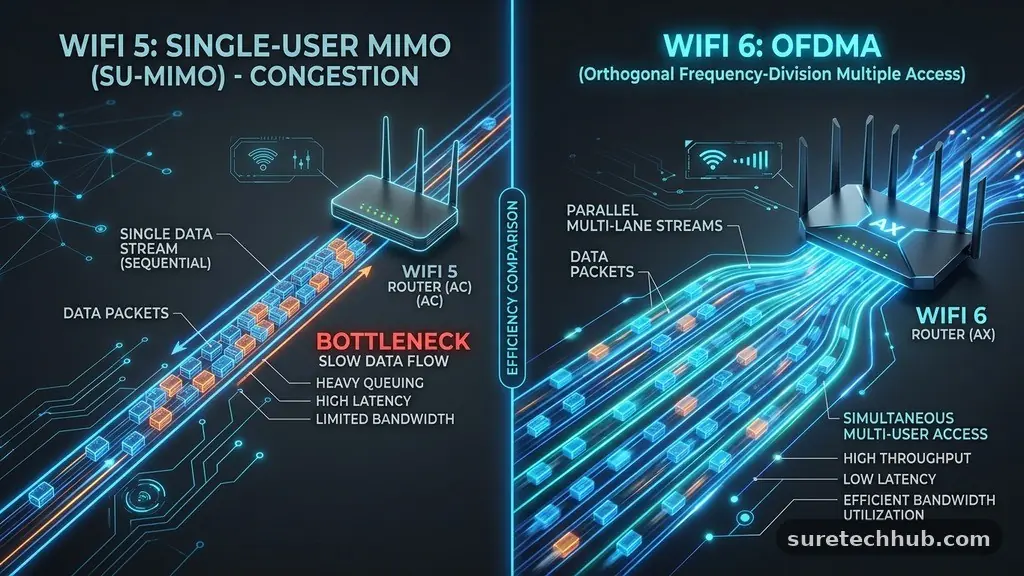
The fundamental shift between these two generations lies in how they manage data packets. Wi-Fi 5 uses a technology called OFDM, which allows a single device to occupy a channel completely until its data transmission is finished.
If you have five devices waiting, they must take turns in a queue, which creates microscopic delays known as latency. This is why gaming or video calls might stutter when someone else starts a large download on another machine.
Wi-Fi 6 introduces OFDMA, which stands for Orthogonal Frequency Division Multiple Access. This allows the router to divide a single channel into smaller sub-channels that can carry data to multiple devices simultaneously.
Instead of waiting for their turn, your phone, laptop, and smart speaker can receive packets in the same transmission window. This dramatically reduces the waiting time for every device connected to your network.
Another major improvement is the implementation of MU-MIMO, which stands for Multi-User, Multiple Input, Multiple Output. While Wi-Fi 5 supports this, it is limited to downstream traffic.
Wi-Fi 6 expands this to both upstream and downstream, allowing the router to talk to multiple devices at the same time in both directions. This is particularly beneficial for modern homes where users are frequently uploading content, such as posting videos or participating in cloud-based work sessions.
Comparing Throughput and Frequency Bands
When looking at raw performance, it is helpful to see how these standards compare across the bands they use. Wi-Fi 5 operates exclusively on the 5 GHz band, which is fast but struggles to penetrate walls and floors.
Wi-Fi 6 operates on both 2.4 GHz and 5 GHz, providing a more versatile approach to home coverage. The following table provides a quick look at the primary differences in capability:
| Feature | Wi-Fi 5 (802.11ac) | Wi-Fi 6 (802.11ax) |
|---|---|---|
| Max Data Rate | 3.5 Gbps | 9.6 Gbps |
| Frequency Bands | 5 GHz only | 2.4 GHz and 5 GHz |
| Efficiency Tech | OFDM | OFDMA |
| MU-MIMO | Downlink only | Uplink and Downlink |
While the theoretical maximum speed of 9.6 Gbps for Wi-Fi 6 is impressive, you will likely never see those speeds on a standard residential internet plan. Most ISPs offer speeds ranging from 100 Mbps to 1 Gbps.
The real advantage of Wi-Fi 6 is not reaching 9 Gbps, but ensuring your existing 300 Mbps or 500 Mbps connection is distributed evenly across all your devices. The increased capacity keeps your network from bottlenecking, even if your total internet speed remains the same.
Efficiency and Battery Life Improvements
One of the most underrated features of Wi-Fi 6 is Target Wake Time, or TWT. This technology allows the router to schedule when devices wake up to send or receive data.
In a Wi-Fi 5 network, your phone or smart sensor must constantly check in with the router to maintain a connection, which consumes battery power. With TWT, the device can “sleep” for longer periods, waking up only at pre-arranged times to exchange data.
This feature is a major boon for IoT devices like smart locks, security cameras, and mobile phones. By reducing the frequency of these check-ins, your battery-powered devices can last significantly longer between charges. While this might not be noticeable on a desktop computer plugged into a wall, it makes a tangible difference for the dozens of wireless sensors found in a modern smart home.
Wi-Fi 6 also improves security standards through WPA3 compatibility. While some Wi-Fi 5 routers received updates to support WPA3, it is a mandatory requirement for Wi-Fi 6 certification.
This provides stronger encryption for your personal data, making it much harder for unauthorized users to gain access to your network. If you are concerned about privacy, upgrading to a router that mandates the latest security protocols is a sensible move.
Range and Wall Penetration
There is a common misconception that Wi-Fi 6 has a longer range than Wi-Fi 5. In reality, the physical range is determined more by the radio power and antenna design of the router than the wireless standard itself.
However, because Wi-Fi 6 uses more efficient modulation techniques, it can maintain higher speeds at the edges of your coverage area. You might find that a spot in your house that was once a “dead zone” now has a usable, albeit slower, connection.
It is important to remember that the 2.4 GHz band remains the king of obstacle penetration. Because Wi-Fi 6 brings the speed and efficiency benefits to the 2.4 GHz band, you gain better performance through walls compared to older Wi-Fi 5 equipment that forced everything onto the 5 GHz band.
If you live in an older home with thick plaster or brick walls, this change is substantial. You are essentially getting better “reach” because the standard is finally making the most of lower-frequency signals.
If you are struggling with range, the best approach is still to use a mesh system. Many modern mesh systems now support Wi-Fi 6, which allows them to handle the backhaul traffic between nodes much more effectively.
This keeps the signal strong as it hops from one room to another, ensuring your entire home stays connected. You can read more about how these standards interact with mesh networks via the official Wi-Fi Alliance resources regarding wireless connectivity.
Hardware Compatibility Requirements
Upgrading your router is only half the battle when moving to a newer standard. To benefit from the features of Wi-Fi 6, your client devices—such as your smartphone, laptop, or tablet—must also support the 802.11ax standard.
If you buy a top-tier Wi-Fi 6 router but only use older devices, you will not see a performance increase. Your network will simply default to the older Wi-Fi 5 protocol to communicate with those legacy devices.
However, Wi-Fi 6 is fully backward compatible. You do not need to throw away your old gadgets just because you upgraded your router. They will connect and function exactly as they did before.
The main benefit of the upgrade comes as you naturally replace your older devices over time. As you bring new phones and laptops into your home, they will automatically leverage the faster, more efficient connection provided by the newer router.
Some users prefer to wait until they have a critical mass of Wi-Fi 6 compatible devices before making the jump. This is a valid strategy, especially if your current Wi-Fi 5 router is still providing stable, reliable performance for your daily needs.
If you are not experiencing buffering or connection drops, there is no urgent need to rush into an upgrade. The technology will only get cheaper and more refined the longer you wait.
Real-World Scenarios for Upgrading
Deciding when to upgrade depends on your specific lifestyle and the number of devices in your home. Below are a few common scenarios where an upgrade to Wi-Fi 6 provides a clear benefit:
- High-Density Households: If you have four or more people living in one home, all streaming video or gaming simultaneously, the efficiency of Wi-Fi 6 will eliminate the “lag” caused by competing devices.
- Smart Home Enthusiasts: If you have 20+ smart devices like light bulbs, cameras, and sensors, the improved management of small data packets in Wi-Fi 6 prevents your network from becoming overwhelmed.
- Remote Work and Video Conferencing: If you rely on stable, low-latency connections for professional video calls, the improved upstream MU-MIMO and OFDMA support will keep your feed clear even when others are using the internet.
- Aging Equipment: If your current router is more than five years old, its hardware is likely struggling to keep up with modern firmware updates and connection demands, regardless of the Wi-Fi standard.
If you find that your internet speed tests show you are getting your full speed when wired into the modem but significantly less over Wi-Fi, an upgrade is likely warranted. This indicates that your router is the bottleneck.
In this case, the Wi-Fi 5 vs Wi-Fi 6 comparison becomes a matter of removing that hardware limitation. You are not just buying a new standard; you are buying a more powerful processor and better radio hardware that can handle the modern web.
Frequently Asked Questions
Is it worth upgrading from Wi-Fi 5 to Wi-Fi 6 today?
If you have a large number of devices, a busy household, or are currently experiencing connection drops, it is definitely worth the upgrade. However, if you live alone or have a small setup with only a few devices, you likely won’t notice a significant difference in your daily experience.
Does Wi-Fi 6 go through walls better than Wi-Fi 5?
While the raw signal physics are similar, Wi-Fi 6 is much better at maintaining a usable connection through walls because it brings advanced modulation and efficiency to the 2.4 GHz band. This makes it more effective at providing coverage in houses with many obstacles.
Do I need to replace all my devices to see a benefit?
No, you do not need to replace your devices. Because Wi-Fi 6 is backward compatible, your old devices will work fine. You will start to see the benefits as you slowly replace your older hardware with new devices that support the 802.11ax standard.
Is Wi-Fi 5 considered outdated?
Wi-Fi 5 is not truly “outdated” in the sense that it is broken or insecure, but it is no longer the state-of-the-art solution for high-density environments. It remains perfectly functional for basic web browsing, email, and streaming on a small number of devices.
Will a new router make my internet faster?
A new router will only make your internet faster if your old router was the bottleneck. If your ISP plan is 100 Mbps, a new router will help you get those 100 Mbps more reliably across your home, but it cannot increase the speed coming from your service provider.
Final Thoughts on Wireless Standards
Navigating the choice between Wi-Fi 5 vs Wi-Fi 6 is ultimately about assessing the demands you place on your home network. If your current setup handles your needs without issue, there is no immediate pressure to change.
However, if your home has become a hub for dozens of connected devices, the move to Wi-Fi 6 offers a much smoother experience. The real-world improvements in how data is managed provide a level of stability that makes a noticeable difference in busy households.
As you look toward the future, remember that the goal is simply to have a network that stays out of your way. Whether you decide to upgrade now or wait for your next device refresh, understanding these differences ensures you are making a decision based on your actual needs. Keep your router in an open, central location for the best performance, and enjoy the convenience of a modern, efficient home network.